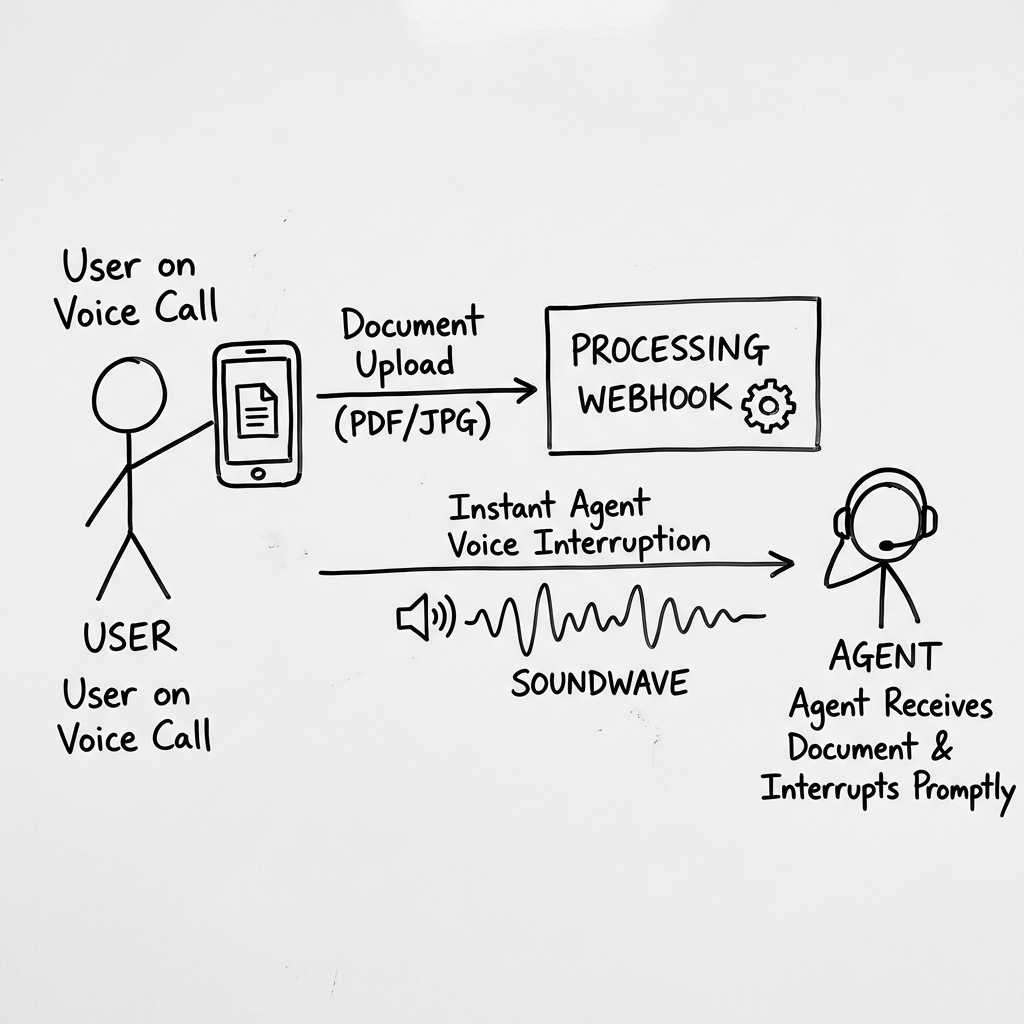
Connecting live audio streams with visual payloads. A look under the hood of Vanira's uploadMedia pipeline over the WebRTC data channel.
Voice interactions are powerful, but they are visually blind. In customer support, sales, or verification workflows, a user frequently needs to show what they are talking about. "I have this billing statement," "My driver's license looks like this," or "Here is the error code on my screen." Forcing the user to hang up, send an email, and wait for a ticket is a massive friction point.
We built Native Multimodal Vision to solve this. Using the uploadMedia() SDK command, users upload images or PDFs directly into the active WebRTC call session. Bytes travel over the data channel (media-bytes on web), then client_media_update triggers process_media. The agent immediately interrupts its current speech track, parses the image, and addresses it in the conversation.
The Client Media Pipeline
When a developer calls client.uploadMedia(file), the SDK sends the file over the WebRTC media-bytes channel (HTTP fallback when needed). Simultaneously, it emits client_media_update on the data channel with media_id, reason, and session context.
Because this notification travels over the real-time data channel, the server receives it synchronously with the call context. This enables the agent to immediately trigger speech interruption: the voice agent stops talking mid-sentence to say, "I see you've uploaded a file. Let me check it for you right now."
"Multimodal vision isn't just about sending pixels to a model—it is about orchestrating visual uploads, reason-tag routing, and active WebRTC speech interruption in one session-bound pipeline."
Reason Tags and Vision LLM Routing
For KYC IDs, invoices, and damage photos, the client sends a reason tag (e.g. kyc_photo) with each upload. Dashboard media handlers map that tag to vision LLM settings — inject_as, interrupt behavior, and optional dedicated vision model — without ever forwarding files to external URLs.
The server runs process_media against the stored media_id. Structured extraction lands in the LLM context window as ground truth, so the voice agent speaks from verified data — all within the same WebRTC session.
T_vision_max = 2000ms if (T_response > T_vision_max): agent.acknowledge_and_retry()
Vision SLA constraint — processing must resolve within ~2 seconds to maintain natural voice conversational flow.
Preventing Double-Speech Overlaps
A critical challenge in multimodal voice interactions is the double-speech anti-pattern. If a user uploads a file and the application code manually triggers an action trigger event or a voice interrupt simultaneously, a race condition occurs in the audio queue. The agent attempts to explain the file while executing the action, resulting in overlapping audio streams.
We resolved this in the SDK by introducing a lock-state on the speech scheduler during file uploads. While uploadMedia is active, all other client-triggered interruptions are queued until the agent-side media processing resolves. This maintains a clean, single-speaker conversational standard.
Orchestrating Visual Ingestion and Text alignment
To ensure the LLM doesn't hallucinate image content, vision output is injected with the reason tag and user question from the upload. When a user references a specific item (e.g., "Why is line item 3 high?"), the agent uses structured vision output to navigate the user's attention with precision.
Technical Engineering Specs
Average time required to upload a 5MB document and notify the WebRTC data channel.
Target time for vision processing to return structured results to the voice engine.
Native support for major image types and multi-page documents.
Time taken to stop the agent's current speech output when a media upload begins.
Experience the Intelligence
Don't just read about the engineering. Test the Vanira Core directly in your browser. Our demo agent handles multi-step tool execution with the exact protocols described above.
Start Engineering Your Voice OS
Vanira is now in open beta. Create your agents, configure your tool-calls, and integrate the SDK in minutes.