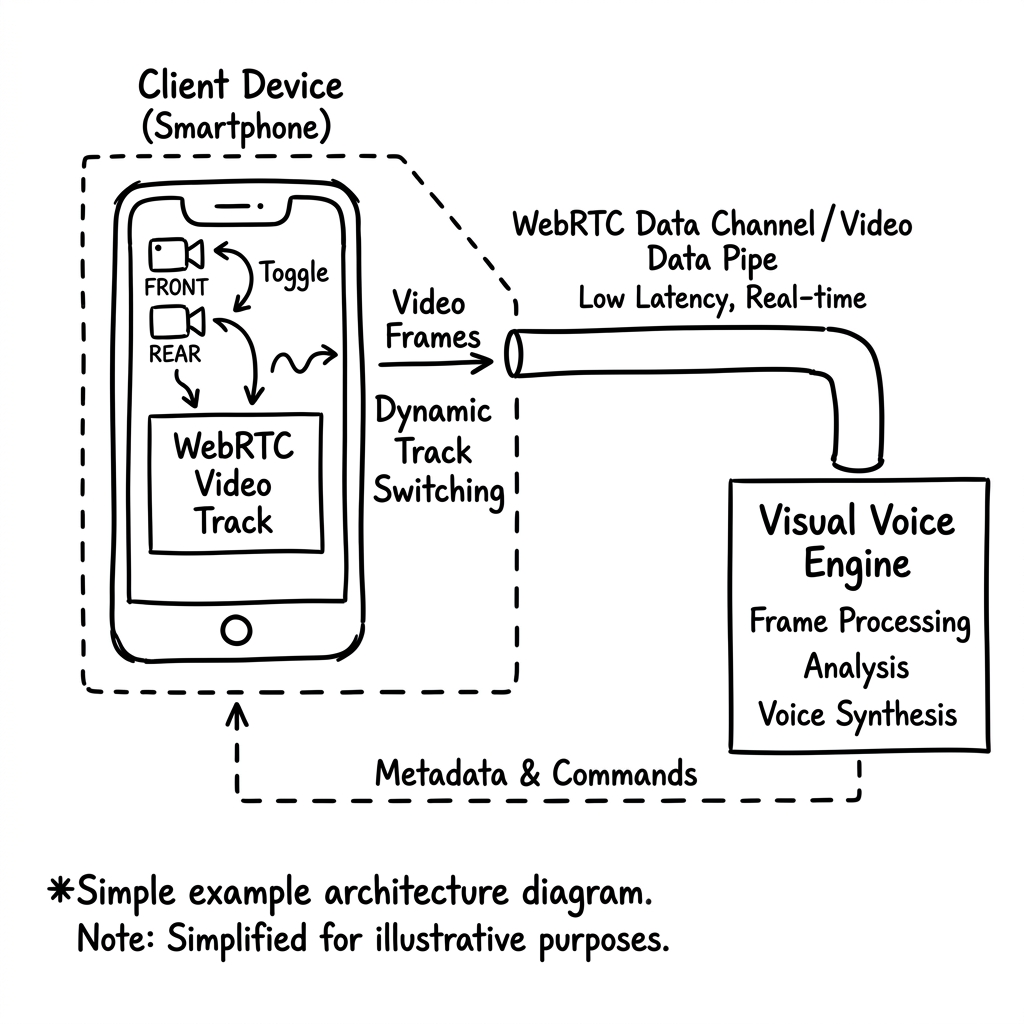
How to configure real-time video track capturing, handle user device permissions, and pipe camera feeds directly to Vanira's multimodal processing engine.
While uploading static documents or snapshots solves many visual validation problems, certain high-intent operations demand live interaction. During hardware troubleshooting, real-world object assessment, or remote identity audits, a static image is a bottleneck. The voice agent needs to see what the user sees, as it happens, to guide them: "please tilt the camera up," or "move a little closer to the light source."
This real-time requirement is met by attaching a video track directly to the active WebRTC peer connection. The SDK negotiates the media streaming setup, permitting the user to switch cameras dynamically and pipe frames straight to the multimodal AI engine.
Capturing and Attaching Video Tracks
Ingesting live video starts by invoking navigator.mediaDevices.getUserMedia({ video: true }). Once the user grants permission, the browser returns a MediaStream object containing the raw video track. Rather than establishing a separate WebRTC session, the SDK grabs the video track and injects it directly into the existing RTCPeerConnection.
This is accomplished by calling peerConnection.addTrack(videoTrack, stream). By reusing the active socket and peer connection, the voice conversation continues uninterrupted while the server-side orchestrator instantly switches the pipeline context to handle incoming visual frames.
"Reusing the existing WebRTC socket for video frames prevents the overhead of creating a secondary connection, preserving sub-200ms latency."
Dynamic Camera Switching (Front vs. Rear)
In mobile browser environments, users frequently need to switch between the front-facing selfie camera and the rear-facing main camera. Handling this cleanly requires enumerateDevices() queries to identify available videoinput sources, followed by track replacement.
Instead of renegotiating the WebRTC connection—which would cause audio drop-out—the SDK utilizes the RTCRtpSender.replaceTrack() API. The browser stops the old camera feed, initializes the new device track, and swaps it in place. The server receives the new video track frames transparently without connection interruption.
Bandwidth Optimization: 720p at 5 FPS
Streaming raw, high-definition video over mobile data connections is a major bandwidth drain. For multimodal document parsing or object recognition, high frame rates (like 30fps) are unnecessary. We optimize the stream in the client SDK by capping the video track constraints.
Constraints = { width: 1280, height: 720, frameRate: { max: 5 } }
Optimal camera stream constraints — balancing image readability with mobile bandwidth conservation.
Capping the frame rate at 5fps reduces data usage by 82% compared to standard video streaming, while maintaining the 720p resolution required for high-accuracy optical character recognition (OCR) and document extraction. The voice stream remains clean, and the client application loads smoothly even on congested 4G connections.
Adaptive Stream Bitrate Negotiation
To protect the audio track quality, the SDK enforces a strict bandwidth allocation policy. If network conditions degrade, the video track bitrate is actively throttled down before the audio track experiences any jitter. This prioritization ensures that the conversational flow is preserved, even if the video feed temporarily lowers in clarity.
Technical Engineering Specs
Latency for track swapping between front and rear cameras using replaceTrack.
Reduction in mobile data usage by restricting stream constraints to 720p/5fps.
Time to initialize camera stream after user approves media permissions.
Optimized camera configuration for high-resolution OCR with minimal data overhead.
Experience the Intelligence
Don't just read about the engineering. Test the Vanira Core directly in your browser. Our demo agent handles multi-step tool execution with the exact protocols described above.
Start Engineering Your Voice OS
Vanira is now in open beta. Create your agents, configure your tool-calls, and integrate the SDK in minutes.